Blender 5 Pivot Points: The Beginner Hack for Faster Modeling
#blender3d #gamedev #3danimation
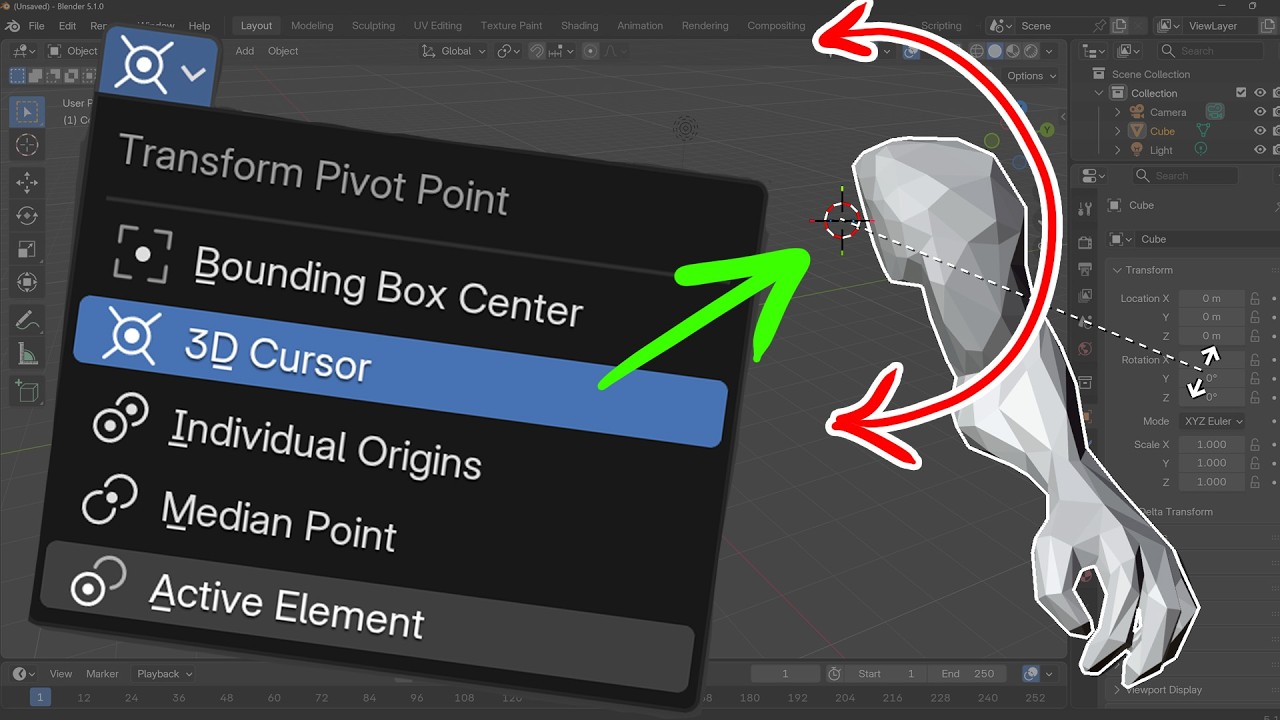
Mastering Transform Pivot Points is excellent for speeding up your workflow in Blender 5. In this beginner-friendly tutorial, we look at every pivot point option so you can start modeling with precision.
I portant for rotating multiple objects at once or positioning complex character joints. We look at everything from the default Median Point to the powerful, often-neglected 3D Cursor hack that makes positioning lights and limbs a breeze.
In this video, you will learn:
How to quickly access the Pivot Point menu (and the Period key shortcut).
The difference between Median Point and Bounding Box Center.
How to use Individual Origins to rotate multiple objects independently.
The "Active Element" trick for precise control.
Pro Workflow Hack: Using the 3D Cursor for advanced rotation, light placement, and character joints (shoulders/elbows).
If you’re a Blender beginner looking to move from "fumbling with tools" to "pro-level workflow," this guide is for you!
Software Version: Blender 5 (also applicable to Blender 4.x)
MY COURSES:
My Complete Blender Creator single course only $28
https://www.gamedev.tv/courses/complete-blender-creator?ref=ywqzmjc
My Mega Pathway Course - build your own asset packs $60: https://www.gamedev.tv/bundles/blender-pathway?ref=ywqzmjc
SOCIALS:
Substack for Articles & Written Tutorials: https://grantabbitt.substack.com/
Gumroad For Free Beginners Booklet: https://grantabbitt.gumroad.com/
My Website: http://www.gabbitt.co.uk
Discord: https://discord.gg/uwF2fcm
Buy Me a Coffee: https://ko-fi.com/M4M21GGIWE
OTHER USEFUL YOUTUBE TUTORIALS:
Learn the basics of Blender 5: https://www.youtube.com/playlist?list=PLn3ukorJv4vv9_e-htADGsPX9TMaQpHV8
Get good at blender series: https://www.youtube.com/playlist?list=PLn3ukorJv4vvv3ZpWJYvV5Tmvo7ISO-NN
Learn Sculpting playlist: https://www.youtube.com/playlist?list=PLn3ukorJv4vvJM7tvjet4PP-LVjJx13oB
#Blender3D #BlenderBeginner #3DModeling #BlenderTutorial #PivotPoints #WorkflowHacks #3DCursor #BlenderTips
recommended graphics tablet:
I use a graphics tablet to paint with and my recommendations are written below:
Ultimate Buyers guide - https://youtu.be/IfC6mTMiaDA
Display Tablet
my choices:_
Display Tablet
XP Pen 16 - 22 or Huion
UK - https://amzn.to/4bIrFhw
US - https://amzn.to/3V7D7vZ
Graphics Tablet
Wacom one
UK - https://amzn.to/39drH1C
US - https://amzn.to/3jrGGd2
Mastering Transform Pivot Points is excellent for speeding up your workflow in Blender 5. In this beginner-friendly tutorial, we look at every pivot point option so you can start modeling with precision.
I portant for rotating multiple objects at once or positioning complex character joints. We look at everything from the default Median Point to the powerful, often-neglected 3D Cursor hack that makes positioning lights and limbs a breeze.
In this video, you will learn:
How to quickly access the Pivot Point menu (and the Period key shortcut).
The difference between Median Point and Bounding Box Center.
How to use Individual Origins to rotate multiple objects independently.
The "Active Element" trick for precise control.
Pro Workflow Hack: Using the 3D Cursor for advanced rotation, light placement, and character joints (shoulders/elbows).
If you’re a Blender beginner looking to move from "fumbling with tools" to "pro-level workflow," this guide is for you!
Software Version: Blender 5 (also applicable to Blender 4.x)
MY COURSES:
My Complete Blender Creator single course only $28
https://www.gamedev.tv/courses/complete-blender-creator?ref=ywqzmjc
My Mega Pathway Course - build your own asset packs $60: https://www.gamedev.tv/bundles/blender-pathway?ref=ywqzmjc
SOCIALS:
Substack for Articles & Written Tutorials: https://grantabbitt.substack.com/
Gumroad For Free Beginners Booklet: https://grantabbitt.gumroad.com/
My Website: http://www.gabbitt.co.uk
Discord: https://discord.gg/uwF2fcm
Buy Me a Coffee: https://ko-fi.com/M4M21GGIWE
OTHER USEFUL YOUTUBE TUTORIALS:
Learn the basics of Blender 5: https://www.youtube.com/playlist?list=PLn3ukorJv4vv9_e-htADGsPX9TMaQpHV8
Get good at blender series: https://www.youtube.com/playlist?list=PLn3ukorJv4vvv3ZpWJYvV5Tmvo7ISO-NN
Learn Sculpting playlist: https://www.youtube.com/playlist?list=PLn3ukorJv4vvJM7tvjet4PP-LVjJx13oB
#Blender3D #BlenderBeginner #3DModeling #BlenderTutorial #PivotPoints #WorkflowHacks #3DCursor #BlenderTips
recommended graphics tablet:
I use a graphics tablet to paint with and my recommendations are written below:
Ultimate Buyers guide - https://youtu.be/IfC6mTMiaDA
Display Tablet
my choices:_
Display Tablet
XP Pen 16 - 22 or Huion
UK - https://amzn.to/4bIrFhw
US - https://amzn.to/3V7D7vZ
Graphics Tablet
Wacom one
UK - https://amzn.to/39drH1C
US - https://amzn.to/3jrGGd2

Grant Abbitt (Gabbitt)
This channel is about games design and game art. I use Blender, Photoshop, Krita and a few other programmes. My tutorials are mainly about How to use Blender. I also Vlog now and again about freelancing, being creative, and the creative industries.
Live ...
Master the Art of Listening #CareerTips #CommunicationSkills #SelfImprovement
Grant Abbitt (Gabbitt)
Blender 5 Complete Beginners Guide - FREE COURSE - Part 8 - Lights & Composit
Grant Abbitt (Gabbitt)