Turn Any Photo into a Game Asset (Fast & Easy Blender Tutorial)
#blender3d #gamedev #3danimation
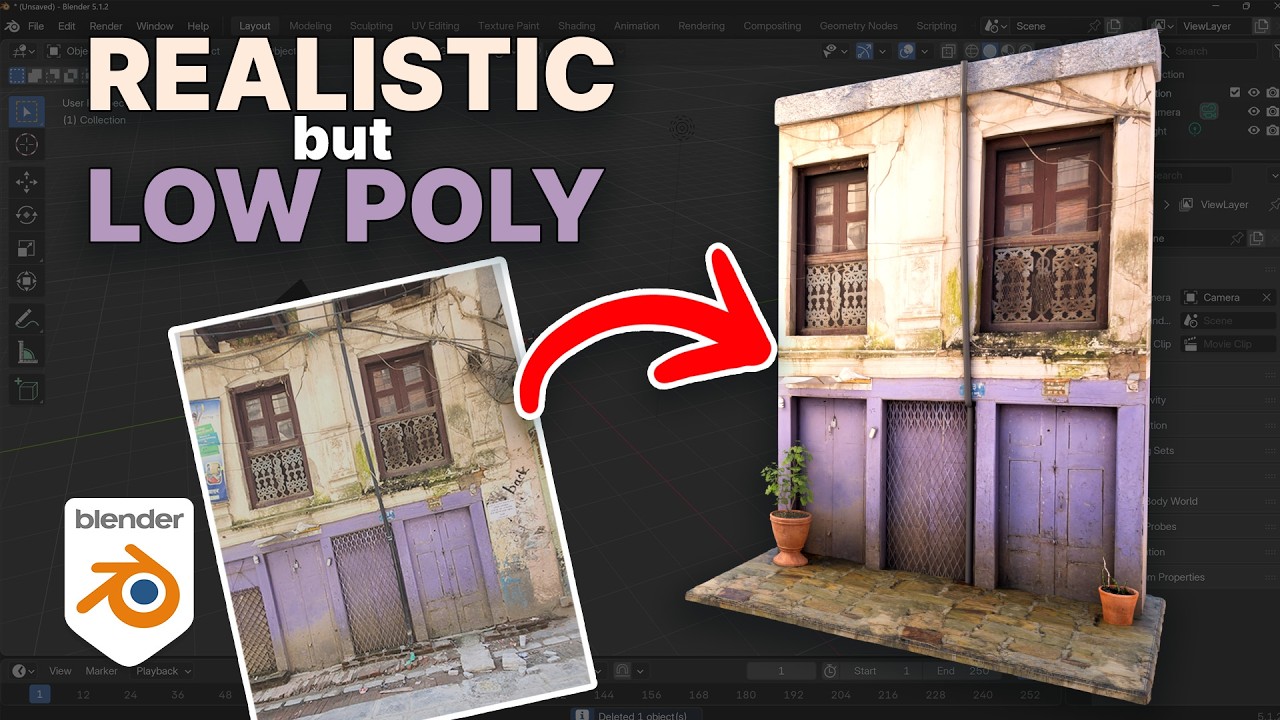
In this Blender tutorial, we look at a fast and incredibly efficient workflow to turn a single real-world photo into a low-poly, game-ready 3D asset.
Texturing doesn't need to take hours or require complex node setups. By preparing a single image (fixing perspective and flattening it out in Photoshop, GIMP, or Krita), we can bring it straight into Blender to trace, model, and project the texture directly onto our geometry. This technique is fantastic for indie game developers who need highly performant, low-poly assets that still retain a beautiful, realistic look.
Whether you're building backgrounds, environment props, or building assets for a game engine, this single-image texturing method will save you a massive amount of time.
If you enjoyed the video, please leave a like and subscribe for more 3D modeling and texturing workflows!
MY PIC Of HOUSE
https://grantabbitt.gumroad.com/l/qvizhi
? Timestamps
00:00 - Introduction: The Power of Single-Image Texturing
00:20 - Fixing Photo Perspective & Lens Distortion
01:15 - Setting Up the Reference Image in Blender
01:58 - Tracing and Modeling the Geometry
06:15 - UV Unwrapping & Projecting the Texture
09:17 - Adding Depth, Dimension, and Asymmetry
21:00 - Fine-Tuning the Low Poly Asset & Wrap Up
? Join the Community
MY COURSES
My Complete Blender Creator single course only $28
https://www.gamedev.tv/courses/complete-blender-creator?ref=ywqzmjc
My Mega Pathway Course - build your own asset packs $60: https://www.gamedev.tv/bundles/blender-pathway?ref=ywqzmjc
SOCIALS:
Substack for Articles & Written Tutorials: https://grantabbitt.substack.com/
Gumroad For Free Beginners Booklet: https://grantabbitt.gumroad.com/
My Website: http://www.gabbitt.co.uk
Discord: https://discord.gg/uwF2fcm
Buy Me a Coffee: https://ko-fi.com/M4M21GGIWE
OTHER USEFUL YOUTUBE TUTORIALS:
Learn the basics of Blender 5: https://www.youtube.com/playlist?list=PLn3ukorJv4vv9_e-htADGsPX9TMaQpHV8
Get good at Blender series: https://www.youtube.com/playlist?list=PLn3ukorJv4vvv3ZpWJYvV5Tmvo7ISO-NN
Learn Sculpting playlist: https://www.youtube.com/playlist?list=PLn3ukorJv4vvJM7tvjet4PP-LVjJx13oB
Recommended graphics tablet:
I use a graphics tablet to paint with, and my recommendations are written below:
Ultimate Buyers guide - https://youtu.be/IfC6mTMiaDA
Display Tablet
my choices:_
Display Tablet
XP Pen 16 - 22 or Huion
UK - https://amzn.to/4bIrFhw
US - https://amzn.to/3V7D7vZ
Graphics Tablet
Wacom one
UK - https://amzn.to/39drH1C
US - https://amzn.to/3jrGGd2
#Blender3D #GameDev #LowPoly #3DModeling #BlenderTutorial
In this Blender tutorial, we look at a fast and incredibly efficient workflow to turn a single real-world photo into a low-poly, game-ready 3D asset.
Texturing doesn't need to take hours or require complex node setups. By preparing a single image (fixing perspective and flattening it out in Photoshop, GIMP, or Krita), we can bring it straight into Blender to trace, model, and project the texture directly onto our geometry. This technique is fantastic for indie game developers who need highly performant, low-poly assets that still retain a beautiful, realistic look.
Whether you're building backgrounds, environment props, or building assets for a game engine, this single-image texturing method will save you a massive amount of time.
If you enjoyed the video, please leave a like and subscribe for more 3D modeling and texturing workflows!
MY PIC Of HOUSE
https://grantabbitt.gumroad.com/l/qvizhi
? Timestamps
00:00 - Introduction: The Power of Single-Image Texturing
00:20 - Fixing Photo Perspective & Lens Distortion
01:15 - Setting Up the Reference Image in Blender
01:58 - Tracing and Modeling the Geometry
06:15 - UV Unwrapping & Projecting the Texture
09:17 - Adding Depth, Dimension, and Asymmetry
21:00 - Fine-Tuning the Low Poly Asset & Wrap Up
? Join the Community
MY COURSES
My Complete Blender Creator single course only $28
https://www.gamedev.tv/courses/complete-blender-creator?ref=ywqzmjc
My Mega Pathway Course - build your own asset packs $60: https://www.gamedev.tv/bundles/blender-pathway?ref=ywqzmjc
SOCIALS:
Substack for Articles & Written Tutorials: https://grantabbitt.substack.com/
Gumroad For Free Beginners Booklet: https://grantabbitt.gumroad.com/
My Website: http://www.gabbitt.co.uk
Discord: https://discord.gg/uwF2fcm
Buy Me a Coffee: https://ko-fi.com/M4M21GGIWE
OTHER USEFUL YOUTUBE TUTORIALS:
Learn the basics of Blender 5: https://www.youtube.com/playlist?list=PLn3ukorJv4vv9_e-htADGsPX9TMaQpHV8
Get good at Blender series: https://www.youtube.com/playlist?list=PLn3ukorJv4vvv3ZpWJYvV5Tmvo7ISO-NN
Learn Sculpting playlist: https://www.youtube.com/playlist?list=PLn3ukorJv4vvJM7tvjet4PP-LVjJx13oB
Recommended graphics tablet:
I use a graphics tablet to paint with, and my recommendations are written below:
Ultimate Buyers guide - https://youtu.be/IfC6mTMiaDA
Display Tablet
my choices:_
Display Tablet
XP Pen 16 - 22 or Huion
UK - https://amzn.to/4bIrFhw
US - https://amzn.to/3V7D7vZ
Graphics Tablet
Wacom one
UK - https://amzn.to/39drH1C
US - https://amzn.to/3jrGGd2
#Blender3D #GameDev #LowPoly #3DModeling #BlenderTutorial

Grant Abbitt (Gabbitt)
This channel is about games design and game art. I use Blender, Photoshop, Krita and a few other programmes. My tutorials are mainly about How to use Blender. I also Vlog now and again about freelancing, being creative, and the creative industries.
Live ...
Master the Art of Listening #CareerTips #CommunicationSkills #SelfImprovement
Grant Abbitt (Gabbitt)
Blender 5 Complete Beginners Guide - FREE COURSE - Part 8 - Lights & Composit
Grant Abbitt (Gabbitt)