Model Size and Hyperparameters Explained
The same AI model can need four times the memory, and the model size number never tells you that.
You pick a model by its size, download it, and it won't load. The number on the page counts one thing, but the memory it actually needs depends on a second setting sitting right next to it. In this video we take model size apart from the top, explain what parameters really are, then bring in the precision setting that quietly decides your hardware bill. Miss it and you'll keep choosing models your machine can't run.
? What you'll learn:
1️⃣ What model size actually measures, and what the B stands for
2️⃣ What parameters are, using a Formula 1 pit-stop analogy that makes it click
3️⃣ How tensor type (FP32, FP16, BF16, INT8) sets the bytes per parameter
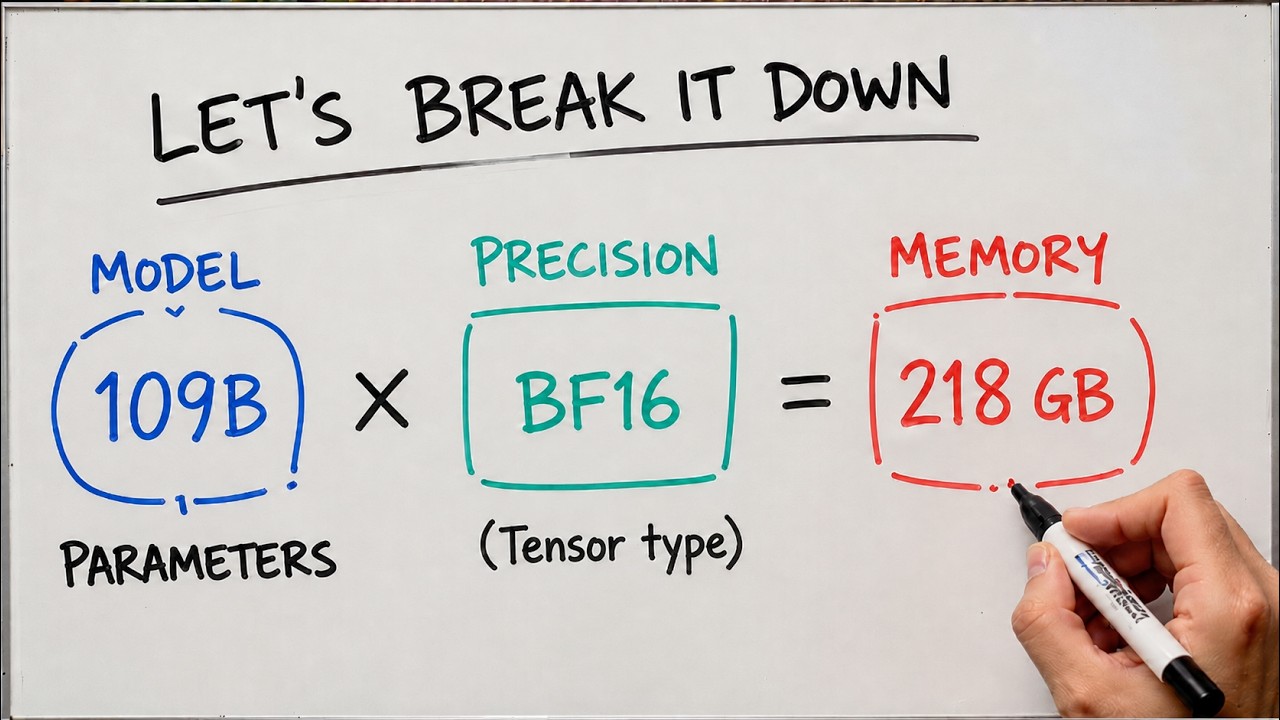
4️⃣ The memory math: parameters times bytes per parameter equals real footprint
5️⃣ Why the same model can need 4x the memory depending on precision
? Start Your AI Journey with KodeKloud: https://kode.wiki/4qsrspX
? Learn AI from this Playlist: https://www.youtube.com/playlist?list=PL2We04F3Y_43f3x3n9pawcEuAwru7bcMG
⏰ Timestamps:
00:00 - Introduction to Model Size & Hyperparameters
00:58 - What model size actually measures?
02:00 - Hyperparameters explained (Formula 1 analogy)
03:32 - Examples across different model sizes
05:30 - Tensor type and precision (FP32, FP16, BF16)
06:28 - How to calculate model size?
08:40 - Running models locally and the GPU question
09:29 - Wrap up
? Subscribe for more AI and ML concepts explained on the whiteboard
#ModelSize #LLMParameters #AIModels #MachineLearning #AI #LLM #TensorType #Precision #BF16 #Quantization #OpenSourceAI #AIExplained #KodeKloud
You pick a model by its size, download it, and it won't load. The number on the page counts one thing, but the memory it actually needs depends on a second setting sitting right next to it. In this video we take model size apart from the top, explain what parameters really are, then bring in the precision setting that quietly decides your hardware bill. Miss it and you'll keep choosing models your machine can't run.
? What you'll learn:
1️⃣ What model size actually measures, and what the B stands for
2️⃣ What parameters are, using a Formula 1 pit-stop analogy that makes it click
3️⃣ How tensor type (FP32, FP16, BF16, INT8) sets the bytes per parameter
4️⃣ The memory math: parameters times bytes per parameter equals real footprint
5️⃣ Why the same model can need 4x the memory depending on precision
? Start Your AI Journey with KodeKloud: https://kode.wiki/4qsrspX
? Learn AI from this Playlist: https://www.youtube.com/playlist?list=PL2We04F3Y_43f3x3n9pawcEuAwru7bcMG
⏰ Timestamps:
00:00 - Introduction to Model Size & Hyperparameters
00:58 - What model size actually measures?
02:00 - Hyperparameters explained (Formula 1 analogy)
03:32 - Examples across different model sizes
05:30 - Tensor type and precision (FP32, FP16, BF16)
06:28 - How to calculate model size?
08:40 - Running models locally and the GPU question
09:29 - Wrap up
? Subscribe for more AI and ML concepts explained on the whiteboard
#ModelSize #LLMParameters #AIModels #MachineLearning #AI #LLM #TensorType #Precision #BF16 #Quantization #OpenSourceAI #AIExplained #KodeKloud

KodeKloud
...